Tuesday, November 13, 2007

Sony book reader

Ars Technica has a review of the Sony PRS-505 electronic book reader. Very strange. $300. It can read books, and play audio (badly). No downloadable software. So if this isn't exactly what you need, then that's it. Move on.

The screen is grey scale. 8 greys. It has alot of dots - 800x600. The screen does not consume power when displaying - just when you turn pages. But, it takes 2 seconds to turn a page. If there's no backlight, then it's game over for me, however. What i really like to do is read in the dark. The batteries last a long time, unless you play audio. There's a memory stick - and, yes, it's Sony's proprietary format. It syncs to Windows computers only. I don't run Windows.

I've read tons of books on my 2002 vintage Palm OS Visor Platinum. It's 8 MB RAM holds tons of books. At one point, i had the entire Bible, and several other books on it. There are at least half a dozen free book readers (software) to pick from for it. One of the book readers was pretty slow turning pages. Not as slow as two seconds, just not very fast. Fortunately, other readers are quicker. The Visor Platinum has an LCD screen, which works fine in bright sunlight, and has a backlight for reading in the dark. If you aren't using the backlight, the batteries last for days. And, since the batteries are just AAA's, you can always bring spares, or stop in at 7/11.

OK, so my new Nokia 770's color screen is nicer. Even very tiny text is very sharp. However, the rechargable battery only lasts 4 or 5 hours. It handles text and PDF's and web pages. FBReader is totally awesome on the Nokia. It's better than the best of the Palm readers. For reading in the dark, i like to set the page to black, and the text to a dark red. Very nice. No screaming white light around the edges - just red text. The Nokia was $150 (on sale). The770 uses an MMC memory card. Can't get it at your local store, but it is an industry standard, available on the net.

Tuesday, November 06, 2007

Ipod Vs My Musix

For various reasons, i have two mp3 players. I've had both units for more than a year. In fact, both units are no longer sold as new. Even though they both have excellent sound, I really only use one of them. Try to guess which one it is after the descriptions below.

One is the original Apple iPod Shuffle. It looks like a white pack of gum with a rounded rectangle look. It has a button in a ring. The button is the play/stop button. The ring has forward a track and (hold it down) fast forward, back a track and (hold it down) rewind, volume up and volume down. There's a blinking light indicating it's on, etc. I mostly ignore it. On the back, it has a three position switch which gives you power off, sequential play and shuffle mode. There's a button which lets you check the state of the internal battery. The light shows green, amber or red.

The unit has a USB connection. You mount it on some computer, add tracks, and delete tracks. You need software which knows how to update the database on the device, otherwise, the device won't play it. I use gnupod, since other software for the iPod doesn't really work for Linux. This software works on the command line, has awful syntax, but this can be fixed with aliases and such in your shell's startup file. The key is that it works. I could say that again, but you'd get bored. You can store things on it that aren't music, for example to copy things from one place to another. Inside, there is half a GB of flash. That's enough for 12 to 20 hours of content, depending on encoding, quality, etc. While you're connected, the battery charges. I don't think about the battery unless i'm going on a long trip. It usually works. But for long trips, the limit is 18 hours of use on a full charge. I haven't tested this lately.

If you pause the unit, it will eventually turn itself off. When you turn it on, it sometimes remembers where you were in a track, and sometimes it skips to the beginning of the track. Sometimes it forgets the track, and skips to the "first track". This is the same as the first track your computer reports is on the device. Sometimes, the software records that you deleted a track, but the track isn't actually deleted. It takes up space, but isn't accessible. It can be hard to figure out which track it is, or even notice that it has happened. The tracks are always renamed with a "1_" prefix added. Sometimes, part of the file names are removed. It might have something to do with the DOS FAT 32 filesystem, and name length limitations or name mangling. Hey, blame it on Micros~1.

The other unit was on sale at Radio Shack, and is called My Musix. It is black, rounded everywhere, slightly fatter than the Shuffle, but otherwise comparable in size. On the front is a fairly large dot matrix display, which tells you what you're doing. There is a big play/stop button. There is a forward track and reverse track rocker, and if you hold them, you get fast forward/reverse. There is a volume up and volume down rocker. There is a record button. There is device lock slider switch. Lock it, and other controls will not respond. Handy for preventing error.

Turn the unit on by pressing the Play button. Turn it off by pressing (and holding) the Play button. Play by pressing Play, right? Well, that depends on what mode you're in. Mostly, i press the Record button first, which puts it into a mode menu. Modes let you change folders, each which might have different content, like a book in one, and space music in another, and podcasts in a third. Have as many as you like. Another is Play mode, where you can opt for sequential or random play. Another mode is Delete. You can delete tracks from the interface. Another mode is Repeat - including none, one track, one folder. Another mode is FM Radio. You can tune in FM stations. You can even record FM. Play the FM later, or download it to your main computer. Another mode is Record. You can record ambient audio. The sound is recorded with 8 bit samples at 8 KHz. Not very high quality. There are two levels of menu. The settings menu has a mode for setting the screen backlight. You can use a red backlight - which is good for astronomy, as it doesn't ruin your night vision.

The unit has a USB connection. You mount it on some computer, add tracks, and delete tracks. No special software. When the device turns on, it figures out what it has, and lets you play it. You can store things on it that aren't music, for example to copy things from one place to another. It ignores things it doesn't understand. Inside, there is one GB of flash. That's enough for 24 to 60 hours of content. That's enough that you can stuff content in a folder for reference. It uses a AAA battery. I use rechargeable batteries. It gets about 8 hours on a charge, but you can bring more batteries with you, so you get infinite duration with minimal preplanning. If you don't preplan, there's always 7/11. And if your rechargeable battery dies a final death, you can always pick up more at the grocery store. The design of the battery cover door suggests that you'll misplace it sometime. So far, i've been careful, and though i've lost it twice, i've also quickly found it again. It's a nuisance when you have to pull off the road to fish under the seat. Probably should have pulled over to change the battery. Think safety first.

If you pause the unit, it will eventually turn itself off. When you turn it on, it sometimes remembers where you were in a track, but always skips to the beginning of the track. Sometimes it forgets the track, folder and everything. You usually get to the first track in a random folder. Well, it's random to me. It even forgets the track when you actually turn it off gracefully, sometimes. It sometimes suffers from the Micros~1 problem. However, it doesn't, in general, rename files. Though long folder names sometimes get renamed to eight characters. This summer, i loaded Lord of the Rings audio book tracks on it, and the unit was bricked. I called customer support, and got software that let me reflash it. The new software fixed the unusual characters in the filenames can brick the unit problem, and cleaned up some display bugs too. I now have the software, and can use it any time to unbrick the unit. Since the unit behaves so much better, i'm actually glad i had to reflash it. In fact, if they had a registration system, and could, for example, send you email when new operating software was available, it would be worth signing up for spam. In any case, the customer support rocked. It's hard to remember when i've dealt with good customer support before.

Note that both units have their faults. The Apple Shuffle needed to keep the form factor, fix rewind so that it can hack into the end of the previous track, fix it so that it remembers where it is in a track when it is turned off, and remove the "off" position, letting it toggle between sequential and shuffle mode only. The form factor is fine - it didn't need to be made smaller. I'd offer it in multiple colors, not just white. Of course, then i'd buy the unpopular polka dot version at discount.

The My Musix needs to have a single menu, not two nested menus. It needs to remember where it was when turned off. If it's going to record, it needs to be high quality 16 bit sound with at least 22 KHz samples, preferably CD rate samples. Mono is OK. The battery cover design needs fixing. The display shows the current track. But if the track title doesn't fit in the display, it scrolls. It starts scrolling instantly, which doesn't give you time to consume the first few characters. Just a couple second pause before scrolling would fix this. It should be offered in multiple colors, not just black. Of course, then i'd buy the unpopular polka dot version at discount.

OK, so which one do i use? Simple interface, half storage? Or complicated interface, replaceable batteries? The answer is that i nearly never use the My Musix. But one day the battery in the Shuffle will die, and i'll switch to the My Musix, and use it for twenty years. And i'll likely pine for the good old days when life was simple.

Friday, November 02, 2007

speling

I've used a spell checker ever since they became available. For me that was about 1980, on a DecSystem 20. That's when i first got access to a spell checker that could quickly offer good guesses as to what i probably intended. These spell checkers improved my spelling skill dramatically. At first, my essays were filled with errors. But, the spell checker would catch them, and usually offer the right word. I'd study how the word was really supposed to be spelled, and after being corrected twenty or thirty times, i'd start getting it right the first time. Spell checkers improved my typing as well.

One must still proofread. That's because spell checkers will not save you form every mistake.

Monday, October 29, 2007

Nokia 770 backup

The ssh package for the Nokia comes with sftp for file transfer. I thought to do backups by creating a big tar file and using sftp over WiFi to get a copy to my desktop. This is not an ideal solution, as one needs to create the whole archive before starting a transfer. That means you have to have enough space to create the archive. Now, the archive could take less than half of your space because tar doesn't waste any space in the last blocks of files, and the entire archive could be compressed.

But the ssh package also comes with scp. The -r option recurses directory trees, and the -p option preserves file modes. The -q option eliminates the messages about what file it's working on, and how far it has gotten, and how long it thinks it will take to finish. I've no idea how long it really takes. Just plug it into AC, connect to the backup machine via WiFi, start the scp, and call it a night.

On the backup machine, running linux, i use my mcmp program to detect files that are, in fact, identical to other files brought over from, for example, previous backups. It can create hard links from one to another, so the backup files only take filesystem space for files that actually changed. For me, that's not alot. Mostly what i do is copy books and audio to it. Reading these things does not cause the files to change. I really should release mcmp. It's fast and reliable.

The desktop computer is also backed up. I plug an external USB hard disk in, and tell it to make a copy. When it's done, i dismount the backup drive and power it down. That way a power spike can't take out both the primary and backup. Single files can be restored, if needed.

Do you have a backup plan for your computer(s)?

Wednesday, October 10, 2007

Word as reader

Have i mentioned how terrible MS Word is as a document reader? Today? A couple starting caveats. First, i'm using Microsoft Word 2002 sp3. Second, this isn't just Microsoft bashing, as fun as that is. Many modern word processors suck as document reader applications. And yet, if someone writes a document in a proprietary format like Word, you expect that somewhere down the line, someone will use Word to read the document. It might be the author, for proof reading. It might be the prospective employer, who needs to read your resume (or is it CV now - latin seems to be making a comeback. Is that because of Harry Potter?).

So, what is it, exactly that is so awful? Is it Page Mode vs. Normal? Is it the zoom level, and having to zoom in when dealing with print resolution graphics, but then zooming out to cope with the text? Is it dealing with objects that don't fit on the screen?

No. It's the idea that the page down and page up buttons change your insertion point and any screen movement is incidental. So if you use the scroll bar, and then forget and use page down, it typically jumps back up.

I'd rant some more, it's so much fun, but there's little more to say.

Tuesday, October 09, 2007

Best Practices

A colleague had this collection of PDF documents on various aspects of building software. One, entitled High-level Best Practices in Software Configuration Management talks about how to get the most out of your source control system. It was written at Perforce Software, Inc., and though it tries to be general in nature, it reflects their product, which i've never used. It was written in 1998, and was obsolete at that time.

The paper talks about branching and code freezes and codelines and workspaces and builds and the processes that an organization must have to do to cope with a serious problem. Merges.

So, in the old days, one used a source control system, like SCCS or RCS, and of course others. In these systems, the source code cycle steps through these points:

  • check out the code with an exclusive edit lock
  • edit the code, and test it
  • check the code back in.


This works OK, as long as you have only one developer, and one workstation for that developer. But the moment this isn't true, then at some point in development, one developer will have a file locked that another developer wants to edit. So, either the second developer waits for the lock to free - perhaps by doing something else, or the second developer asks the first to add her changes too, and check them in. Or perhaps even more creative solutions are explored.

But often, the second developer is working on a version of the code that will be released at some other time than the first developer is working on. Same application, just code that won't be released for an extra month. Then, each developer needs their own set. The usual way to do this is for at least one developer to create a branch, and work there. Now, when the first developer finishes his release, the code is checked in.

The second developer has a new problem. The code she started with isn't the code that's now in production. Changes made for the first release aren't in the code set for the second release. These changes need to be merged into the new set. The key point in this Best Practices paper is Get the right person to do the merge. It's important to do this step right because it is error prone, tedious, and did i mention error prone? I've done this work. I've even been the right person for the job. I volunteered for this work because I wanted it to be done right. It wasn't that my efforts would be lost if it wasn't done right. It was that the team's progress could be lost if it wasn't done right. And no one else on the team seemed to understand the problem. And yet, the correct right person to do the merge isn't a person.

As early as 1993, i was using CVS. Here, the computer performs the merges. It's fast and reliable. If the merge detects a conflict, it notates this in the code and allows the developer to fix it. But because of this simple change, the whole source code control flow changes. Now it's like this:

  • check out the code
  • edit the code, and test it
  • update the local copy with changes from the repository
  • check the code back in (but leave this new copy out).


Now, the only time that the source code is locked is for a few seconds while the code is being checked back in. Since the code is nearly never locked, any developer can edit whatever they want whenever they want to. The merge happens during the update.

A merge conflict happens when there is a change to the same line of code. When that happens, the two versions of the code are marked in the updated file. The developer edits the file, figures out if one version, the other, or some new code is needed to resolve the conflict.

One might think that since updates are performed all the time, that developers would be constantly fixing merge conflicts. This is not the case. Generally, if two developers change the same line of code, it usually means that they are working on the same problem. If they aren't working on the same problem, there are seldom any conflicts.

So, in a multiple release system, branching is still needed. But the merging process can be automated. And it's long past time that we should need to do this by hand.

So, this is old news, right? Why rehash it now? Because vendors still sell obsolete software. For example, i work for a company now that uses Serena's Dimensions product. This product, based on PVCS, is an old style edit-with-lock and manual-merge system. It has some nifty work flow stuff layered on top, but the hard problems are still hard, and color the way any work is done. To wit, our current release is projected to be at least two weeks late because it was noticed too late that a merge would have to be made. (Sorry, Serena's site seems to be dehanced for Firefox with a pointless entry gate screen. Entry gates went out in about 1995.).

To be fair, i have no idea how Serena thinks that an issue like: Development processes involve time-consuming and unreliable manual hand-offs can be solved with their product. As near as i can tell, if you want overlapping releases, you are stuck with manual merge.

So who bought into this system? Why aren't we using CVS or SVN, which are free? Did they consult with senior developers? I wasn't consulted. These are Best Practices. It must be some definition of Best that i've not heard.

Thursday, October 04, 2007

Alcohol

Very funny xkcd.com cartoon.

Since alcohol slows reflexes, one would think that it would slow thinking in general. As programming requires some of most intense thinking anywhere, one would expect that imbibing would categorically be a bad thing. Yet, there are two pieces of evidence that i'm aware of that contradict this.

I worked with a guy who preferred working from home, over a slow modem, to working in the office. At home, he could work with a six pack of beer (brand not specified). He said it was less painful. Let's say he sees a bug. When sober, his reaction was Damn! Another bug. But after a beer or so, his was reaction was Ha ha ha, another bug, and he'd get right to it. So, apparently, psychology can be an important factor for programming.

But i also did an experiment, mostly by accident. In the mid 80's, i was at this keg party of mostly geeks. Thing about keg parties is that i'm a really cheap drunk. It just doesn't take much to get a buzz. So, i can't really count cups (they were plastic, and so can't be properly called glasses) after one. I've no idea how much i had. Enough so the Universe spun, but not enough to bring me to the ground. Anyway, this guy, whose name i don't recall, was talking to me, and i mentioned this graphing package that i'd just written. We had forty something devices capable of plotting results, and they were all different. Our plotting packages only knew about three or four of these each, so you got your output on one of those. If you wanted output on a better one, you'd start from scratch using another package. So, i invented an intermediate format, and a series of filters that could translate to and from it. This guy said he had access to a new laser printer, and had the manual for it. How long would it take to create a filter? I'd have said a couple hours. You know, just take a filter that looks like it, and modify it. He wanted to do it right away.

Now my judgement was nearly entirely impaired, so despite the time, maybe two in the morning, we started right away. We staggered to my office, and started hacking at it. I don't remember the details. But when i got in to work later in the morning, the resulting filter still worked. Further, the code wasn't bad. Over time, the bugs will eventually show themselves. But no maintenance was needed for this filter. Ever.

Windows ME really was pretty awful. But it seems more likely that alcohol was involved in the decision to release it rather than in development.

Friday, September 28, 2007

Psion Organiser II

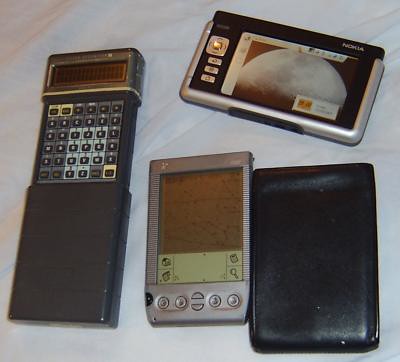
Psion Organiser II, Nokia 770, Handspring Visor PlatinumIn 1987, i picked up two Psion II Organisers. They were really hot when they came out! They look pretty much the same as each other, but one has 32 KB RAM, and the other has 8 KB RAM. RAM is used for file storage too, but internal RAM has some special features. There are two slots for expansion memory for file storage. They come in two flavors. RAM with a watch battery for persistence. And EEPROM. The Psion can write to it. But you can't rewrite. This can be overcome by marking records for deletion. When it becomes full, copy the stuff somewhere else, erase the pack, then copy stuff back to it. This is how you get the space back from deleted files. They also came with an RS-232 serial cable, and you can copy files to a host, like DOS, back and forth. This is how backups are done. The 8 KB system has some limitations. It can't use my 32 KB RAM pack. You must have 4 KB RAM free to use the serial port. They also can make beeping sounds. Pitch and duration are controllable, so i wrote a music program. Sounds like one of those birthday cards that you open and it makes noise. But, you can write your own tunes, with multiple octaves, repeats, etc. The display is two lines of 16 characters. There are user defined characters, giving one almost pixel by pixel control.
The serial port on my 32 KB Psion died. That meant it could no longer be backed up, and i stopped using it for anything more than a calculator. The 8 KB Psion is still nearly pristine. Well, except that dates past 1999 don't work in the calendar. Feh. Bloody Y2K.

These machines have the Hitachi 6303x processor. This chip can access 64 KB of memory. Half of this is ROM, more or less. They run at about 2 MHz. The 9 volt battery lasts a couple months of normal use.

The applications include a calculator, calendar (appointments), notes, file transfer (with special software on the other side) and remote login (can act like a terminal). The units are also programmable. On board, there is a language called OPL. OPL is something like BASIC, but without line numbers, and with block structure. Even after years of not seeing this language, i can read and write these programs without reference to the manuals. There's something to be said for a language that easy. There is also a cross assembler that runs under DOS. I studied the manuals, but never actually wrote anything for it.

So, a comment suggested that my new Nokia 770 is probably much faster. No need to guess. I have benchmark results for both, using benchmarks i started using in 1982. Here are some numbers:

Matrix Multiply
Timex780Machine & Language
0.03083143.2100Athlon 1913 MHz C
12.12007.9900Athlon 1913 MHz Perl 5.8.8
5.159618.7800Nokia 770 C
238.47000.4060Nokia 770 Perl
9.820014.1300Compaq Aero 486sx/25 C
25920.00000.0037PocketC Visor Platinum
612000.00000.0001Psion Organiser IIXP OPL


Sieve
Timex780Machine & Language
0.0602310.2300Athlon 1913 MHz C
19.5707.0900Athlon 1913 MHz Perl
0.896154.7900Nokia 770 C
181.7500.3800Nokia 770 Perl 5.8
278.2140.4490Compaq Aero 486sx/25 C
90744.1330.0014Compaq Aero 486sx/25 Perl*
22135.0000.0063Palm Platinum Cbasic
57000.0000.0020Psion Organiser II OPL


Unfortunately, i don't have Perl benchmark runs for the Aero. I probably hadn't written them yet. I have extrapolated a Sieve Aero time using Athlon times. This doesn't work for the Matrix Multiply, as the 486sx/25 didn't have floating point hardware. But to be fair, i didn't use Perl on it much. No, i really don't have eight significant digits of timing information. I'm just trying to get the decimal points to line up. Benchmarks like this often have a ten percent variance between runs anyway. The Vax 780 was benchmarked in the early 1980's, and was considered by many to be the 1 MIPS (Million Instruction per Second) machine. But since some machines must execute more or fewer instructions to get something done, a more fair comparison is to test some workload.

There are two workloads here. The Matrix Multiply does lots of floating point multiplies and adds, with two dimensional array indexing. The Sieve performs integer comparisons and single dimensional array indexing. Since neither the Palm nor the Psion have floating point hardware, both of these machines perform relatively better at the Sieve than the Matrix Multiply. The Psion CPU doesn't have integer multiply, handy for two dimensional arrays.

But yes. The new Nokia is 300 times faster for the Sieve, and 2,500 times faster for the Matrix Multiply. And yet. Both of these benchmarks are in languages that compile to a virtual machine code, which is then interpreted. Any semi-modern desktop using a real compiler should be 20 million times faster than the Psion. When i get a benchmark run in C on the Nokia (easy enough), i expect a factor of 300 to 400 improvement over the Perl version. And if i manage to shoehorn the matrix multiply into the Nokia's DSP (Digital Signal Processor - a super computer's vector processor of sorts) (and more difficult to accomplish) then the sky's the limit. That's how the Nokia does sound and video, after all. Or, i might run into the short vector lengths (20). To be fair, i haven't attempted this in the Athlon's funky on-chip FPUs or GPU.

A brief note about Perl. Yes, there's a huge performance hit compared with C. But even on the 486sx/25, many applications would be fine. For example, many web based programs would still finish in much under a second, and you'd think it fast. And for some machines, it's not a factor of 300, it's a factor of 1,000. And it's still OK. This still bothers me. Perl 5.8 (and later, i suppose) comes with a Perl compiler, which improves things by a factor of five. I don't see it used much. Another odd thing is how little code i have hanging around written in Perl at home. For the past six years or so, it's been my primary language. But when i want to write something at home, it's nearly always in C.

Thursday, September 27, 2007

Nokia 770

The digitizer on my 2002 vintage Handspring Visor Palm Pilot is crapping out on me. It's functional, but every few seconds, i have to recalibrate the digitizer. Sometimes, it messes up during the recalibration, and it can take five minutes to get through it. It often helps to try twisting the whole device this way and that to get it to work. So, i want to replace it.

Some history. Before getting the Visor, i had a 3.5 pound subnotebook. It could do everything my desktop could do, but with less memory and disk. Further, it could communicate with my desktop fast enough for backups and data sharing. But, it was more expensive than my desktop. When it died, i did without for a number of years. Eventually, i picked up the Visor, and though i lost much of what i'd used the subnotebook for, i started using the Visor for new things that i now depend upon.

One way to replace the Visor is to pick up a cheap Palm. The cheapest $100 Palms have three or four times as much memory, are faster, and have color. What's not to like? Just backup the Visor, restore to a new device, and get on with life. But i'm the type of guy who shops carefully for bananas. This is much more important and expensive than bananas.

The deep dive investigation should take into account the Three P's. Portability, Performance, and Price. If it isn't portable, you won't use it. If it can't do what you want, you won't use it. If you can't afford it, don't buy it. But otherwise, price can be optimized. You might get performance at the sacrifice of portability. That would be the desktop.

I did a wider search for bliss, and discovered that the Nokia 770 (in process of being replaced by the newer, bigger Nokia 800) has been heavily discounted, and appears in my price range. It has some new capability. It combines the functionality of my old subnotebook, but with the portability and applications of an organizer. It runs Linux, like my desktop, though that isn't evident from the casual look. Linux is under the hood, and i can get at it. It has the power and resources to do things even a new Palm won't do. Here's a comparison:

FeatureCompaq AeroVisorNokia 770
Date1995-19992002-20072007+
Display640x480 grey160x160 b/w800x480 color
Data entrykeyboard, mousestylusstylus *
Carry inbrief casepocketpocket
Performance10 MIPS5 MIPS100 MIPS
CommunicationsCable 22 KB/secUSB 100 KB/secUSB or Wireless 1 MB/sec
ProgrammableYesNot reallyYes
Apps usednote pad, planetarium, book reader, calculator, Web GUI-DB backed app development, web browsingnote pad, planetarium, book reader, calculator, calendar, sketch, contacts, music apps.Video clips, photo album,note pad, planetarium, book reader, PDF reader, calculator, calendar, sketch, contacts, music apps, Web GUI-DB backed app development, web browsing
User file store70 MB4 MB192+ MB
Cost$600$110$150 (sale)


While the 770 has a stylus, it also has remote login, as did the subnotebook. But that means that one can use the desktop's keyboard. Further, a wireless bluetooth (or WiFi?) keyboard can be purchased. A USB keyboard might be usable, but the 770 does not have a powered USB port, so a powered hub would be needed. To make it portable, you'd need a battery powered powered USB hub. A bluetooth keyboard would be cheaper and easier. I'll try remote login from the desk first.

In the last months of my Visor, i experimented with various languages for it. Chipmunk Basic is free, but is a crippled version of BASIC, and is slow. Lispme is free, implements a variant of scheme, nearly produces executables that you can hand out (you need to give them the whole environment), the environment is fragile, and the speed isn't very good. There is a free C cross platform compiler that runs under Linux, but what i'm looking for is something i can goof around with on the device. Really, the Visor is too slow to be acceptable for an interpreter. Further, the Visor's one-app-at-a-time execution environment means that the user has to wait for any computation to take place. My best guess is that Quartus Forth is the best language. It's not free, but it produces small standalone executables. Too late.

By contrast, the Nokia 770 has a Perl environment installed when you buy it. That means i can hand out a perl script, and that's it. It will just work. And tiny perl scripts can do alot. There's also a shell, so shell scripts are also possible out of the box. While there is a native C compiler - word on the street says it runs out of resources for non-trivial applications. There is a cross platform C compiler. Python and Ruby can be installed. Further, the processor performance is high enough that a language that does not compile to the native iron, like Perl, Ruby and Python, is acceptable for a large number of applications. Further, since it really multitasks, the user can start a computation, and do something else while waiting.

It's been about a week. So, for example, i haven't tracked down and installed a calendar application. So far, the search has only turned up an app that can't turn on the machine and beep. On the other hand, i haven't even gotten a wireless router set up. How have i gotten anything? Well, one of my neighbors, has an open wireless setup, and cable. Thanks, whoever you are. I've been real happy with it so far. But the real test is how i'll like it over the next few weeks.

The latest news is that it appears that there is a Palm OS emulation application. It may be possible to download my favorite Palm OS apps, and run them on the Nokia.

Tuesday, September 25, 2007

My job is so secret

So, imagine that you have a development cycle where a two line can take six months to make it into production, assuming diligent developers and savy management. By the time the fix gets into place, everyone involved has forgotten what needed fixing. Devlopers have been working in a devlopment environment, where the fix has been around for ages. Testers have to be reminded that it isn't a new bug, and, by the way, the fix is in the pipeline. End users have forgotten that they needed it fixed.

My job is so secret that not even i know what i'm doing.

Wednesday, September 19, 2007

Pirate talk

Pirate flagIt was Talk Like A Pirate Day today. Arrg, mateys, and you can lay to that!

Thursday, September 13, 2007

Dark Energy

I was at the store the other day, and noticed that they now sell disk drives that can hold a terabyte of data. Well, of course they hold more data. The whole Universe is expanding!

Tuesday, September 11, 2007

Queues

The third Rule of Acquisition clearly states, "Never pay more for an Acquisition than you have to", ST:DS9, The Maquis, Part II.

So, large American, Car companies want to save money while conducting their business. Business is complex, and computers can help keep track of things, etc., so they use them. Over time, the Information Technology department becomes rather large and complicated in and of itself, so they look for ways to save money there, too. All this is natural.

One of the issues with computers is that they themselves are rather complex, and require considerable training to use, program and maintain. Good database administrators, programmers, systems administrators, etc., are highly skilled people and therefore are expensive. In general, companies are drawn to organize these people by skill, putting like people into like groups. For example, there's a systems administration group, or a database administration group. A programmer, attempting to write or maintain some application needs to communicate with such a group to make use of such expertise, but also to get access to relevant systems to make needed changes.

As the organization grows, these groups change from technology enablers, to technology gate keepers. They become responsible for systems security, enforcing corporate policies, and so on. To reduce costs, these groups are reduced in size until each person is fully loaded with work. The result is that when a programmer needs to make changes in a system, their request enters a queue, and weeks go by before any action is taken. When mistakes are made, more weeks go by before corrective action is taken. This can be true even for the most trivial of changes, where the programmer had appropriate expertise to make changes, but did not have authority.

And, an honest analysis shows that the body count isn't reduced. It turns out that both the requesting programmers, and the servicing administrators are required to fill out paperwork, perform extra unneeded steps, and real productivity is minimal. The customer has to wait longer, and everyone ends up with more overhead than actual productive work. Far from ensuring quality, mediocrity is enforced. This is not the fault of the individuals.

This tendency to crowd people together by type has long been recognized in industry. The resulting stovepipes generate communications difficulties and pointless overhead. It is not unusual for the overhead to exceed an average of twenty or thirty times the amount of real work, as measured in hours. Worse, much of the overhead is geared to measure progress. Data from these logs are used by managers to show that the system is becoming more efficient, even as latencies grow ever longer. These statistics are, of course, wrong, not just misleading.

Clearly, it's no fun to work in an environment that is mired in bureaucracy. But how does one fix the system? The key is to point out just how terrible the system has become for the end customer. Further, one needs to point out how the head count has grown while productivity has decreased. The evidence clearly shows that small integrated teams, with all the expertise in a tighter nit group are considerably more effective. One needs systems administration, database administration, developers, business liaisons all in one place. If single individuals have competence in more than one area, they are that much more effective. That suggests that small groups control their hardware, systems software, and applications software. Small groups should develop their own standards for backup, source control, coding style and database naming conventions, application deployment, and so on.

Sure, the larger company should have policies, but the development group should be able to treat these as suggestions. If they decide to deviate from company policy, they should be able to do so without a waiver of any kind. Then, the policies will reflect business needs, rather than reflect blind guesses.

What about external requirements, like SOX? These are business requirements, like any other. Let the development group handle them. If they require reporting, then reports become policy or part of the automation, as makes sense. The key is that things should make sense.

Wednesday, August 29, 2007

Thumb loading

I talked about thumb drives a while back. And, i'm at it again, downloading huge amounts of stuff and tossing it onto thumb drives.

Not only does it take awhile to fill a 2 GB kingston, but it also sends the load average through the roof. It's typical to take an otherwise unloaded system from a load of zero to a load of 5. And, it stays there for the duration. What's with that? The CPU is 99.7% idle. So, it's not like parallel ports where the CPU needs to do something every few bytes transfered. What are the other 4 tasks waiting to run? And despite the low CPU load, responsiveness during copies to the USB thumb devices is sluggish and jumpy.

This is under Linux.

Anyone have any idea why? Is it different under Windows? Mac? OS/X?

Tuesday, August 28, 2007

Canoe trip

Ducks on a log

It's late in the season, but the canoe trip experience has finally taken place. We're not talking about a shakeout run to make sure everything works. We're also not talking about days on the water, or some other big deal. But, a trip with passengers. It's taken nearly a month to get it together.

Since we're, at heart, city folk, the trip takes place in a city. The Huron River runs through Ann Arbor, MI. Since it was otherwise quiet and peaceful, we brought along a couple ten year olds to provide continuous noise. The ducks were unable to compete with this noise, and so, stayed quiet themselves.

Gorgeous day. This is, unfortunately, the best picture taken all day. It had to be modified to look even this good. Mallards, i think.

Monday, August 27, 2007

Internal Discipline

bug eyesWhen we last left our hero the large organization was overrun by high latency task groups that were effectively obstacles to progress.

Another feature of large organizations, and by large i mean organizations with more than one person, is externally applied discipline. The problem to be solved is How does one motivate the employee to produce good work?. For the software developer, it's the wrong question.

One of the common management approaches to this problem is characterized by the carrot and stick paradigm. The idea was that to get a horse to pull the buggy, one had a carrot and a stick. The carrot was a reward for good behavior. The stick was punishment for bad behavior. Now, modern management has no experience with horses, or they'd know that the stick was not for punishment. The carrot was suspended by a string from the stick. But that isn't the modern interpretation.

Any parent will note that a promised reward is a much better motivator than punishment for children. In fact, punishment doesn't work very well, and not at all over the long haul.

But managers generally don't think that they have anything to offer an employee (which is false). They also don't think that they can get away with much in the way of punishment (which is also false). So, despite the above very common and widely talked about concept, it often plays almost no actual role in obtaining quality work.

What managers really know how to do is the paper trail. To get the developer to use source control, have a manager sign off that code is in the system. To get the developer to adhere to database standards, have a database administrator approve any database usage or changes. To get the developer to add user level help pages, have someone who only handles installing help pages on the system review the text and install it. To make sure that the customer is satisfied, have the customer sign off on the project before it is placed on the server. Each of these processes adds delays to the project, but do they ensure quality?

No. It turns out that the database administrator doesn't know anything about the application code. So even a simple query that uses only indexed keys might in fact be issued to the database millions of times. Only the developer would know that. The help text manager doesn't really know the application, and can easily miss omissions and outright errors in the text. Worse, help text usually concentrates on the details of how a function works, but never gives the end user any idea why one might want to use the function. That takes context. The customer signs off on the application, but does so at application launch. It may be a month before the customer is familiar enough with the product to be able to really evaluate it.

External discipline is inefficient and ineffective. The solution is to empower the developer to do the right thing. First, the developer should be aware of the kinds of quality that the customer wants. It may be consistency, repeatability, discoverability, ease of use, etc. Second, for those quality issues that only a developer could understand, review should be made by another developer. Code reviews have the side benefit of disseminating knowledge. Even the most senior developers learn something. Involve the database administrators early in the process, not late. The DBA should suggest good ways to do things up front, not stall a project nearing completion. To do that, the developer and the DBA need to work together. For best possible speed, they should be a single person. The customer should be able to give feedback at any time, not just before the launch.

Thursday, August 23, 2007

Empowerment

bug eyesLarge organizations have a problem. It's a hard problem to solve. That is, how do you organize the division of labor when you have a large number of people? It's not a new problem. Sun Tzu's The Art of War covers it. The general was asked, "How large an army can you command?". His answer was "the larger the better". Old problem but solved.

People tend to learn new skills fairly slowly, so it is commonly thought that no one knows how to do everything. In any case, the large organization tends to discover, often by luck, that a person knows how to do some specific task, and then uses them for that one task exclusively. As the organization gets larger, groups of people form to perform specific tasks, and the organization tends to treat these the same as individuals, performing one task forever.

The large organization then takes these task groups and establishes processes that let the groups get things done together. When there is a complaint that the process isn't written down, it tends to get written, and becomes less flexible. When problems of quality arise, and let's face it, humans make mistakes, the reaction is to manage quality by requiring that a high level manager signs off on actions. But these people don't know how to do everything, so they don't know how to judge quality. They become a source of latency for projects, with no added value. Management thinks in terms of paper trails, and requires paper documents for everything.

The ebb and flow of work to do means that some task groups feel overloaded from time to time. They set up often elaborate queues where tasks are submitted, and 'customers' are given a minimum wait to get things done. For example, a database administration group may require a minimum of a week for any task - even if the task requires no analysis, no research, no diagnosis, just a simple command sent to the software. Often, these groups require that there is no face to face or even phone contact, and miscommunications are frequent, requiring resubmission of the task, with attendant latency.

So, let's say you're a developer, and the project is to project a web based application. Checking your source into the source tree requires sign off from the source code control group. Placing the application on the server requires sign off from the hardware and web server software groups. The database administrators need to sign off on the way the database is used, even if there are no new tables. The help text for your application is managed by yet another group. The application took a week to write, but takes an additional six weeks to deploy, if you're lucky.

How can this be fixed? Instead of attempting to manage quality by instituting sign offs by management enforced by restricted access to systems, the trend should be to manage quality by automated paper trails, with automated back-out systems for failure mitigation. The emphasis is on automation to reduce latency. Empower the developer to get things done by giving them the tools needed to get the entire job done. Trust that the developer will attempt to do the right thing, but don't be afraid of failure. Fear of failure causes paralysis.

There are a complicated set of issues. For brevity, this is just one of them.

Monday, August 20, 2007

Troll

Kirk vs Janeway

COBOL vs Java

Miata vs Jeep

Spaceship One vs Shuttle

Meede vs Orion

Discuss

Wednesday, August 15, 2007

Monday, August 06, 2007

Tom Swift

On the way home from Bible Camp, my ten year old son and i listened to a 4 hour book downloaded from Librivox. Tom Swift and the Visitor From Planet X, written by Victor Appleton II. It went over well. There was a cliff hanger every chapter, except the last. This could be serialized on radio easily. 20 Chapters, so they must have only been ten or fifteen minutes each. That's short enough for nearly any attention span.

The reader, Mark Nelson is very good. No memorable mistakes. Maybe there aren't any. He does it with a 1950's style, with gusto, WoWee! But should you want to read it yourself, the full text is available on Gutenberg.

It's science fiction, with an action/adventure feel, but i had difficulty placing just when it might have been written. It has a 1950's style, but seemed to have references to more modern inventions. Fortunately, one doesn't have to guess, since Wikipedia knows it was written in 1961. And, it knows who Victor Appleton II is, and what a busy guy Tom really is. He had something like a hundred such adventures. And those are just the ones that have been written up so far.

The story has it all. Hot sex - well - there was a quick kiss on the cheek. I wasn't paying attention. It might have been Tom's sister. And, it has violence. Well, there was an earthquake, and some property damage. Space aliens, including the Visitor from Planet X. I was hoping the space alien would have something to teach us about global warming or world peace. Not a word. The one named villain turned out to be a spy working for the good guys. In retrospect, it's hard to believe there were 19 cliff hangers.